
Let’s talk honestly about tracking what you eat.
You wake up on a Monday morning filled with good intentions. You tell yourself that starting today, you are going to eat clean, hit your protein goals, and log every single morsel that enters your mouth. Breakfast goes smoothly—a couple of eggs and a slice of toast. Easy enough.
Then lunch happens. You grab a quick bowl of homemade curry, a handful of nuts from a coworker’s desk, and a coffee with a splash of milk that you didn’t measure. By dinner, you are staring at a plate of home-cooked food trying to guess how many tablespoons of cooking oil went into the pan, and the sheer thought of opening a logging app fills you with complete exhaustion.
This is where most people quit.
The main problem with diet tracking isn’t a lack of willpower. The problem is that most people approach it like an intense math homework assignment rather than a simple tool to build awareness. You do not need to measure every single leaf of spinach or become obsessed with every decimal point to see real health progress.
A great food tracking app shouldn’t feel like a digital parole officer judging every bite. It should feel like an effortless background diary that helps you spot hidden patterns, make better choices at the grocery store, and figure out what actually makes your body feel good.
Here is a human, practical breakdown of the best diet tracking apps available in 2026, and how to choose one that fits your actual life.
The “Will I Give Up After 3 Days?” Decision Matrix
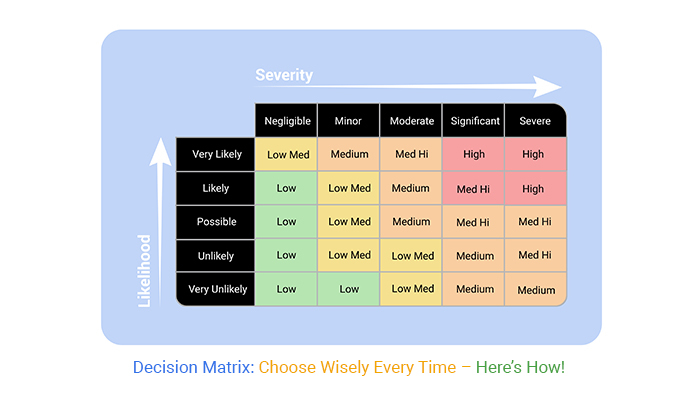
Before downloading five different apps and filling your phone with annoying reminders, let’s run the top options through a honest, real-world reality check:
| App Name | Tracking Vibe | Learning Curve | The Real-World Reality Check | Best Suited For |
| MyFitnessPal | Massive & Fast | Very Low | The absolute king of food databases, but free features have gotten increasingly stingy over time. | Anyone who wants quick, effortless food searches |
| Cronometer | Data-Heavy & Precise | Moderate | Insanely accurate micronutrient tracking, but logging complex home recipes takes genuine patience. | Health nerds, athletes, and lab-test enthusiasts |
| Lose It! | Gamified & Friendly | Low | Very intuitive for basic weight goals; cheerful interface makes logging feel less like a chore. | Beginners who want simple calorie tracking |
| HealthifyMe | Regionally Tailored | Low | Unbeatable for Indian meals, curries, and home-cooked regional dishes that Western apps butcher. | Anyone eating Indian, South Asian, or home-cooked food |
| Carb Manager | Macro-Focused | Moderate | Built specifically for low-carb and keto diets; calculates net carbs automatically without math. | Low-carb, keto, and diabetic-friendly diets |
| Lifesum | Habit & Lifestyle | Low | Focuses on overall food quality and healthy habits rather than punishing you over calorie counts. | People who hate strict counting and want wellness focus |
| Foodvisor | Snap & Log | Very Low | Takes a photo of your plate to guess your food; cool technology, though you still need to adjust portions. | Visual people who hate typing out ingredients |
The 10 Diet Apps That Are Actually Worth Your Storage Space
                     THE NUTRITION TRACKING RADAR

                             SIMPLICITY & CALORIES
                             (Lose It!, Lifesum)
                                   ╱ ╲
                                  ╱   ╲
                                 ╱     ╲
                                ╱       ╲
                               ╱         ╲
                   MICRONUTRIENTS ─────── REGIONAL & SPECIALTY
                   & ATHLETICS            DIETS
               (Cronometer, MFP)          (HealthifyMe, Carb Manager)
1. MyFitnessPal: The Uncontested Heavyweight
There is a reason MyFitnessPal remains the default choice for millions of people. Its verified food database is utterly massive. Whether you are eating a pre-packaged snack, dining at a popular chain restaurant, or scanning a barcode on a random box from your pantry, chances are high that someone has already logged the exact nutritional data for you.
- The Best Part: The speed of logging is unmatched. The search bar handles obscure brands with ease, and its massive user community means you rarely have to enter nutritional facts manually.
- The Annoyance: The developers have moved popular legacy features (like the built-in barcode scanner in certain regions) behind a paywall, and the main dashboard can feel cluttered with ads on the free tier.
2. Cronometer: The Precision Tool for Data Lovers

If you treat your health like a science experiment, Cronometer is your absolute best friend. While most apps only care about calories, protein, carbs, and fats, Cronometer analyzes up to 84 different vitamins, minerals, and micronutrients.
- The Best Part: Every single food submission in their database is vetted and verified by staff for accuracy. You won’t find duplicate or fake user-created entries with wrong numbers.
- The Annoyance: The app expects precision. If you don’t know the exact weight or volume of your food, logging on the fly can feel slightly tedious compared to looser apps.
3. Lose It!: The Friendly Companion
Lose It! takes away the clinical, medical feel of nutrition tracking and replaces it with a bright, encouraging interface. It tracks your food, sets reasonable weekly targets, and rewards you with small visual celebrations when you maintain a helpful streak.
- The Best Part: The “Snap It” photo feature and smart camera reader allow you to quickly scan your meal or package without digging through endless dropdown menus.
- The Annoyance: The free version regularly nudges you to upgrade to their premium plan, which can get slightly annoying if you just want basic tracking.
4. HealthifyMe: The Hero for Regional & Home-Cooked Meals

If you regularly eat dishes like dal, roti, sabzi, idli, biryani, or complex home-cooked regional meals, standard Western tracking apps will drive you crazy. HealthifyMe was built specifically to solve this problem, featuring an enormous database of regional dishes and local ingredients.
- The Best Part: It accurately measures complex home cooking, understanding the difference between a butter roti and a plain phulka, or various types of regional home-cooked gravies.
- The Annoyance: The app aggressively promotes its AI coaches and nutritionist consultation packages on the home screen.
5. Carb Manager: Built for Low-Carb Lifestyles
Counting net carbohydrates manually (total carbs minus fiber and sugar alcohols) is a head-splitting exercise. Carb Manager handles all the arithmetic automatically, making it the top choice for people following keto, low-carb, or blood-sugar-conscious eating styles.
- The Best Part: Displays your daily net carbs front and center in a clear visual wheel, complete with glycemic index markers for common foods.
- The Annoyance: If you aren’t actively limiting your carbohydrate intake, the interface and macro ratios won’t make much sense for your goals.
6. Lifesum: Focus on Habits Over Strict Math

Lifesum is designed for people who get easily overwhelmed or stressed out by raw calorie numbers. Instead of making you feel guilty over a slice of cake, it uses color-coded food ratings and weekly habit scores to help you eat more whole foods.
- The Best Part: Beautiful, minimal Scandinavian design that treats health as a holistic journey rather than a strict accounting spreadsheet.
- The Annoyance: Deep dietary analysis and specialized meal plans (like high-protein or Mediterranean) require a paid subscription.
7. Foodvisor: For the Visual Loggers
Foodvisor uses artificial intelligence to analyze a quick photo of your plate. It attempts to identify the individual food items, estimate the portion sizes, and log the meal automatically into your diary.
- The Best Part: Eliminates a massive chunk of typing. Taking a quick picture of your lunch takes about two seconds.
- The Annoyance: AI is not psychic. It frequently confuses similar-looking items (like mashed potatoes versus cauliflower puree) and needs occasional manual correction.
8. MyNetDiary: The Organized All-Rounder
MyNetDiary is a quiet, highly reliable app that hits a sweet spot between ease of use and detailed tracking. It offers excellent diabetes-tracking features, custom recipe builders, and a very clean tracking interface.
- The Best Part: Exceptional recipe import feature. You can paste a link to a recipe website, and the app automatically extracts the ingredients and calculates portion nutrients.
- The Annoyance: The app interface, while functional, feels a bit traditional and less modern than competitors like Lifesum.
9. YAZIO: Structured Fasting and Food Tracking
YAZIO combines standard meal logging with built-in intermittent fasting timers. If you follow an 16:8 or 18:6 eating window, this app lets you track your fasts and your food in the exact same spot.
- The Best Part: Eliminates the need to download a separate fasting app alongside your nutrition logger.
- The Annoyance: Most of the high-quality recipe guides and structured meal plans sit firmly behind the paid subscription wall.
10. Fitbit App: The Integrated All-in-One Option
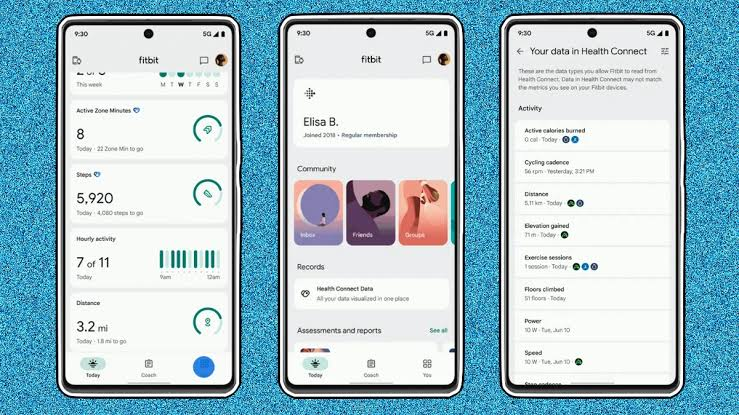
If you already wear a fitness tracker on your wrist every day, using the built-in food logging tool inside your existing health app saves you from downloading another program.
- The Best Part: Automatically balances your real-time calorie burn against your food intake without needing third-party sync setup.
- The Annoyance: The food database is not as rich or easy to navigate as dedicated trackers like MyFitnessPal.
5 Human Rules to Keep Diet Tracking Sustainable
- Log Before You Eat, Not Before You Sleep: Trying to remember every bite, splash of oil, and quick snack at 10 PM is a recipe for frustration. Spend thirty seconds logging your meal before you eat it.
- Embrace “Good Enough” Estimations: You don’t need to bring a digital food scale to a restaurant or a friend’s dinner party. Pick a similar item in the app database, make a reasonable guess, and move on with your life.
- Build Your Go-To Meal Library: Most human beings eat the exact same five or six breakfasts and lunches on repeat. Save those meals as custom presets so you can log them in a single tap.
- Don’t Subtract All Your Exercise Calories: Fitness trackers routinely overestimate how many calories you burn during a workout. If your tracker says you burned 500 calories on a run, don’t view that as a green light to eat 500 extra calories of junk food.
- Use It as a Temporary School, Not a Lifetime Sentence: You don’t have to log your food for the rest of your life. Use these apps for four to six weeks to learn what real portion sizes look like, and then rely on your intuitive awareness.
Frequently Asked Questions
What is the absolute best diet tracking app for beginners?
Lose It! or Lifesum are the easiest entry points for beginners. They both feature intuitive interfaces, simple barcode scanners, and visual setups that won’t overwhelm you with complex medical data or endless charts.
Are free diet tracking apps good enough, or do I need to pay?
Free versions are completely fine for 90% of people. Free tiers allow you to search food databases, log daily meals, and track primary macros (protein, carbs, fats). Paid tiers are only necessary if you want advanced features like custom macro goals by day or deep micronutrient breakdowns.
How do I log complex home-cooked dishes with multiple ingredients?
Use the Recipe Builder feature available in almost every major app. Add all the raw ingredients and cooking oil into the builder once, set the total number of servings, and the app will calculate the exact nutritional breakdown per portion every time you make it.
Will tracking my food lead to obsessive behavior?
It can if you focus entirely on strict perfection. Treat the numbers as broad estimations rather than rigid rules. If tracking makes you anxious, stop using the app immediately and focus on whole, nutrient-dense foods instead.